
A construction quote lure led to device code phishing, three rogue Entra devices named iAuthFlow-Device, and seven weeks of mail access before a thread hijack.
Key takeaways
- On 25 August 2026, an operator we track as KeyStealth used a construction quote lure and device code phishing to sign in to a Microsoft 365 account at a US business, then registered two rogue Entra ID devices within 22 seconds of receiving a token.
- All three rogue devices carry the display name
iAuthFlow-Device, the name of a phishing kit sold for $10,000 by a seller called PHISHLETS, and report the Windows version hard-coded as a default in the open source ROADtools library. - The devices gave the operator primary refresh token (PRT) sessions for seven weeks. Each return visit started with a check of the account’s security info, then moved to Outlook, where the operator opened or updated attachments on 25 sent messages.
- On 15 October 2026, the operator created a one-character inbox rule to hide a customer’s replies, offered that customer ACH or Venmo payment as the employee, and hard-deleted the sent copy. Containment disabled the account 12 minutes later, before the customer answered.
- Public reporting on the kit centers on attacker passkeys that survive a password reset. The one passkey added in this intrusion was created in the target’s own Edge browser and was never used.
Background
On 25 August 2026, a user at a US business that bids on construction work opened what looked like a PDF attachment in a reply to a quote request. Five minutes and 44 seconds later, the Microsoft Authentication Broker issued a token for the user’s account to a client running behind a residential proxy. The operator kept access for seven weeks and was removed on 15 October 2026, 12 minutes after it began hijacking a customer email thread.
KeyStealth is our name for the operator behind this intrusion.
The rogue devices tie the intrusion to a commercial kit. Abnormal published research on iAuthFlow v2 on 20 August 2026, five days before this intrusion (Abnormal, Callie Baron and Piotr Wojtyla). Abnormal reports that the kit is sold by a seller named PHISHLETS on a Russian-language cybercrime forum, for $10,000 plus separately priced modules. Its analysis covers the Google build, which relays the victim’s sign-in through a remote browser and enrolls a passkey during the session. Abnormal reports that the seller also advertises Microsoft, iCloud, and LinkedIn versions. Abnormal based its analysis on the seller’s posts, demonstration videos, and a test instance. SecurityWeek covered the research on 21 August 2026.
This case shows a different technique from Abnormal’s Google demonstration. The target entered a password and approved multifactor authentication (MFA) from their own network, and the operator’s client received the resulting tokens through the device code flow.
The closest published investigation is Huntress’s report on the Knight Office kit (Huntress, 2 September 2026). Huntress documented device code phishing, a residential callback proxy for the first sign-in, a rogue Entra ID device, and a Windows Hello for Business key added to the account. The Knight Office device reported a different Windows build (10.0.19044.1826), and its token replay came from Tencent Cloud ranges.
Everything below comes from Entra ID sign-in and audit logs, the Microsoft 365 audit log, endpoint DNS telemetry, the delivered email messages, and public registration, certificate, and sandbox records.
Figure 1 shows the intrusion from lure to thread hijack.
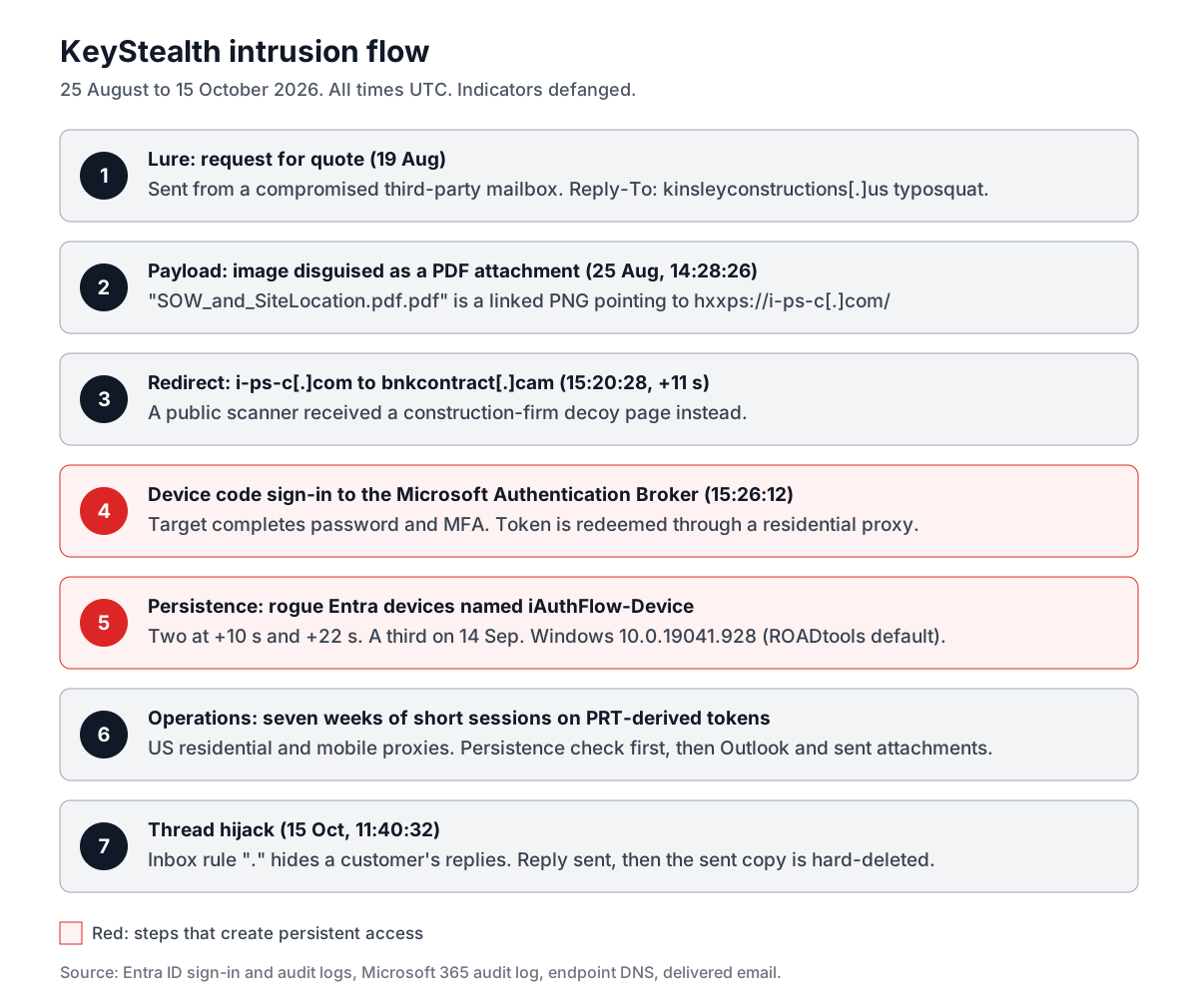
Figure 1: The KeyStealth intrusion flow, 25 August to 15 October 2026. Steps 4 and 5 created the access the operator used for seven weeks.
The steps in Figure 1:
- A request for quote arrives from a compromised third-party mailbox, with replies directed to a typosquat of a real construction firm.
- Six days later, the typosquat sends an image disguised as a PDF attachment that links to
i-ps-c[.]com. - The target’s browser follows
i-ps-c[.]comtobnkcontract[.]cam. A public scanner received a decoy page instead. - The target completes a device code sign-in, and the operator’s client receives a Microsoft Authentication Broker token.
- The operator registers rogue Entra ID devices named
iAuthFlow-Device. - The operator returns in short sessions over seven weeks.
- The operator hijacks a customer email thread and hides the evidence.
Initial access: a quote request with a fake PDF attachment
The first email arrived at 14:17:13 UTC on 19 August 2026. It asked for a rough estimate, a cost breakdown, and an overview of the target’s process for a new project, and it was signed by an estimator at a real regional construction firm. The message came from the compromised mailbox of an unrelated small business and was sent through GoDaddy’s outbound mail relay.
Three addresses in the message point to three different organizations:
| Field | Domain | Role |
|---|---|---|
| From | A compromised third-party small business | Delivers the opener from an established mailbox |
| Reply-To | kinsleyconstructions[.]us |
Typosquat that receives the target’s reply |
| Signature | The real construction firm’s domain | Makes the message look legitimate to the reader |
The target replied asking for project details. The typosquat answered the next day, 20 August 2026 at 11:54:48 UTC, through Google’s mail servers with SPF passing for kinsleyconstructions[.]us.
The payload followed six days later, at 14:28:26 UTC on 25 August 2026. The “Re: Request for Quote” message apologized for the delay, said the job description and location were attached, and offered a site visit. It contained no attachment. Figure 2 shows what the target saw in its place.

Figure 2: The inline image in the payload email. It imitates an attachment chip and links to hxxps://i-ps-c[.]com/.
The image is a PNG wrapped in a hyperlink to hxxps://i-ps-c[.]com/, which Microsoft Defender for Office 365 Safe Links rewrote on delivery. The doubled .pdf.pdf extension is part of the image text.
The target’s workstation resolved i-ps-c[.]com at 15:20:28 UTC and bnkcontract[.]cam 11 seconds later, at 15:20:39 UTC.
A public URLScan scan of i-ps-c[.]com at 13:29:06 UTC the same day received a different page. Figure 3 shows it.

Figure 3: The decoy page served by i-ps-c[.]com to a URLScan scan at 13:29:06 UTC on 25 August 2026. Screenshot from URLScan.
The decoy imitates a real design-build firm headquartered in Lexington, Kentucky. Its contact address is hello@gray-example.com, its phone number uses the fictional 555 exchange, and it gives two founding years: “since 1974” in the banner and “since 1960” in the statistics. The page has no scripts, forms, or redirects. Later, Cloudflare served its “Suspected Phishing” warning for i-ps-c[.]com.
The scanner received a static decoy, while the target’s browser continued to bnkcontract[.]cam within 11 seconds. This is cloaking: the site shows harmless content to scanners and sends targets on to the phishing page.
Technical analysis
Stage 1: Device code sign-in to the Microsoft Authentication Broker
The device code flow lets a user sign in to a device without a keyboard, such as a conference room display. The device shows a short code, the user enters it at Microsoft’s sign-in page on another device, and Microsoft issues tokens to the device that requested the code. In device code phishing, the attacker requests the code and persuades the target to enter it, so Microsoft issues the tokens to the attacker’s client. The target signs in on Microsoft’s real page and completes real MFA, so the sign-in looks legitimate.
The sign-in sequence on 25 August 2026, all for the Microsoft Authentication Broker client 29d9ed98-a469-4536-ade2-f981bc1d605e:
| Time (UTC) | Event | Source |
|---|---|---|
| 15:21:21 | Three failed password attempts | Target’s network |
| 15:23:13 | Sign-in interrupted for MFA | Residential IPv6 address (Charter, Alabama) |
| 15:23:41 | MFA approved in Microsoft Authenticator | Target’s phone |
| 15:26:12 | Sign-in succeeds | Same residential IPv6 address |
The failed attempts, the MFA prompt, and the successful sign-in share one correlation ID. The successful sign-in at 15:26:12 UTC is the token this post measures later events from.
Microsoft reported in February 2025 that Storm-2372 switched to the Microsoft Authentication Broker client ID in device code phishing because the resulting refresh token can request a token for the Device Registration Service, register a device, and then obtain a PRT (Microsoft Threat Intelligence). The KeyStealth intrusion follows the same sequence.
The later sign-ins confirm how the access started. Of 211 later sign-ins by the operator, 209 carry the original transfer method deviceCodeFlow. Microsoft keeps this marker on a session through later token refreshes (Microsoft Learn), so these records trace back to the original device code grant.
The Broker client, the deviceCodeFlow marker, and the token redemption through a residential proxy show that the target completed a device code sign-in started by the operator.
Stage 2: Three rogue devices with a ROADtools fingerprint
Device registration adds a device to Entra ID so that it can receive a PRT, a long-lived token that Windows uses for single sign-on to Microsoft 365 apps (Microsoft Learn). A registered device the operator controls can request a PRT for the user and use it to obtain access tokens for any app the user can reach.
The operator registered the first two devices within 22 seconds of the token:
| Device | Registered (UTC) | Time after token |
|---|---|---|
iAuthFlow-Device #1 |
2026-08-25 15:26:22 | 10 seconds |
iAuthFlow-Device #2 |
2026-08-25 15:26:34 | 22 seconds |
iAuthFlow-Device #3 |
2026-09-14 00:54:10 | 19 days |
All three devices report the same profile: operating system Windows 10.0.19041.928, trust type AzureAd, profile type RegisteredDevice, no manufacturer or model, and a new certificate key pair for each registration.
That Windows version is a default in ROADtools, an open source toolkit for Entra ID research. The excerpt below is trimmed from register_device() in roadlib/deviceauth.py (ROADtools on GitHub, MIT license, retrieved 15 October 2026):
def register_device(self, access_token, jointype=0, ..., device_type=None, device_name=None, os_version=None, ...):
    if not device_name:
        device_name = 'DESKTOP-' + ''.join(random.choices(string.ascii_uppercase + string.digits, k=8))
    if not device_type:
        device_type = "Windows"
    if not os_version:
        if device_type.lower() == "windows":
            os_version = "10.0.19041.928"
When no name is supplied, ROADtools generates a DESKTOP- name. When no OS version is supplied, it uses 10.0.19041.928. The rogue devices carry a custom name and the default version, so the tool behind them uses ROADtools code or a port of it and sets only the device name.
The third device was registered at 00:54:10 UTC on Monday, 14 September 2026, 19 days after entry. No interactive sign-in by the user precedes it. The operator still held a token that could register devices.
The operator also tried to add the eM Client desktop mail app to the account on 27 August and 20 September 2026. Both attempts failed with error 90094, because the app requires administrator consent.
Stage 3: A synced passkey added during the sign-in
A passkey was added to the account at 15:25:41 UTC on 25 August 2026. That is two minutes after the MFA approval and 31 seconds before the token. Its authenticator identifier, AAGUID d3452668-01fd-4c12-926c-83a4204853aa, belongs to Microsoft Password Manager, the passkey store built into Microsoft Edge (passkey AAGUID registry).
The target’s workstation looked up the Edge passkey service and the My Sign-ins page shortly before the passkey appeared, so the passkey was created in the target’s own Edge browser. No sign-in used it.
Abnormal’s report on the kit describes a passkey module that enrolls an attacker-controlled passkey during the victim’s session, so the attacker can sign back in after a password reset. In this intrusion, persistence came from the rogue devices.
Stage 4: Seven weeks of short operator sessions
The operator returned in short bursts between 25 August and 15 October 2026, including Sunday 20 September and Saturday 26 September. Most bursts began between 14:50 and 17:30 UTC. The final burst began at 11:35:45 UTC.
Every burst opened the same way. Within about five seconds, the session touched My Apps, My Profile, Microsoft Approval Management, and Microsoft Account Controls V2, and read the directory settings through Settings_GetSettingsAsync. These are the services behind the account’s security info page. The operator was confirming that its devices and methods were still in place before it worked the mailbox.
The sessions ran on PRT-derived tokens, recorded with incoming token type primaryRefreshToken, and showed no token binding. Requests came from US residential ISPs, the Verizon, T-Mobile, and AT&T mobile networks, and Zscaler egress addresses in more than 20 states. The address changed between requests: the final burst used 22 addresses in 42 minutes. This is a commercial residential proxy network, and none of the IPv4 addresses had a VirusTotal detection.
The browser identified as Edge on Windows and tracked the current stable release, from version 151 in August to 155 in October. Some requests carried a non-standard trailing token, OS/10.0.17763 or OS/10.0.20348, which are the build numbers of Windows Server 2019 and Windows Server 2022. Non-browser requests identified as MSAL (“Rich Client 4.x”). The sessions ran through a relay or automation browser on Windows Server hosts.
The operator used Outlook on the web, the Outlook attachment download service, Microsoft Search, Teams services, and SharePoint. Copilot services (the Substrate LLM API, Enterprise Copilot Platform, and M365ChatClient) loaded in two sessions. The audit log does not record Copilot prompts.
The mailbox activity focused on sent mail. Attachments on 25 messages in Sent Items were opened or updated, covering quotes, proposals, orders, drawings, and accounting records. Fourteen of those came in one session on Saturday 26 September 2026.
Stage 5: Thread hijack with a one-character inbox rule
The final session on 15 October 2026 targeted a customer lead that had arrived through the business’s website contact form. The operator took three steps in six minutes:
- At 11:40:32 UTC, it created an inbox rule named
.that marks messages from the customer’s Gmail address as read, moves them to the Conversation History folder, and stops processing other rules. - At 11:42:43 UTC, it sent a reply to the customer from the employee’s account.
- Between 11:43:01 and 11:43:19 UTC, it moved the sent copy to Deleted Items, soft-deleted it, and then hard-deleted it.
The rule hides the customer’s answers from the employee, and the deletion removes the operator’s message from Sent Items. The operator can then continue the conversation as the employee while the employee sees nothing.
The reply offered the customer same-day ACH payment or Venmo and asked which one they preferred, so the business could “forward the payment details”. An earlier message in the thread had told the customer ACH was unavailable. The reply also removed the business’s accounting address from the recipients. It carried no bank details or attachments beyond the business’s logo.
The customer answered about 14 minutes later, choosing ACH. That reply arrived after containment disabled the account at 11:52:46 UTC. No payment details were sent.
Between 11:43:26 and 11:45 UTC, the operator opened or updated attachments on 10 more sent messages. Containment disabled the account at 11:52:46 UTC, 12 minutes and 14 seconds after the rule was created. Later sign-in attempts failed with error 50057, account disabled. The three device objects were still enabled after containment.
Infrastructure and attribution
The operator used two kinds of domains: lure domains registered a year before use, and new correspondence domains that impersonate the construction firm. The table below lists registration and use:
| Date | Domain | Event |
|---|---|---|
| 2025-09-06 | i-ps-c[.]com |
Registered at Spaceship, privacy-proxied |
| 2025-09-10 | bnkcontract[.]cam |
Registered at Spaceship, privacy-proxied |
| 2025-09-17 | bnkcontract[.]cam |
Referenced by an invoice lure PDF |
| 2026-07-27 | wmmeagency[.]cam |
Registered at Spaceship with Google Workspace mail |
| 2026-08-11 | kinsleyconstructions[.]us |
Registered at Spaceship with a registrant email at wmmeagency[.]cam |
| 2026-08-18 | kinsleyconstructions[.]us |
Re-registered at Registrar.eu with a Gmail registrant |
| 2026-08-25 | i-ps-c[.]com, bnkcontract[.]cam |
Used in the click chain |
| 2026-09-06 and 2026-09-10 | i-ps-c[.]com, bnkcontract[.]cam |
Expired into Spaceship parking |
| 2026-10-14 | wmmeagency[.]cam |
Moved to Cloudflare with new certificates |
The two lure domains shared the Cloudflare nameserver pair lochlan and paityn.
The correspondence domains connect through registration records. The first registration of kinsleyconstructions[.]us used a registrant email address at wmmeagency[.]cam, and its re-registration a week later at a different registrar carries the same hashed registrant phone number. Both registrations list a registrant in a different city: Tuscaloosa, Alabama for the first, and Lexington, Kentucky for the second. The Lexington address matches the headquarters city of the firm the decoy page imitates. The domain was hosted at Hostinger (2.57.91[.]91) before moving to Team Internet parking, and sent mail through Google with SPF passing.
bnkcontract[.]cam had an earlier use. A one-page PDF named INV-2123701.pdf, first submitted to VirusTotal at 14:44:41 UTC on 17 September 2025, contains the URL hxxps://bnkcontract[.]cam/Invoice.bnkcontract.cam/?druck. Figure 4 shows the document as rendered in a sandbox.
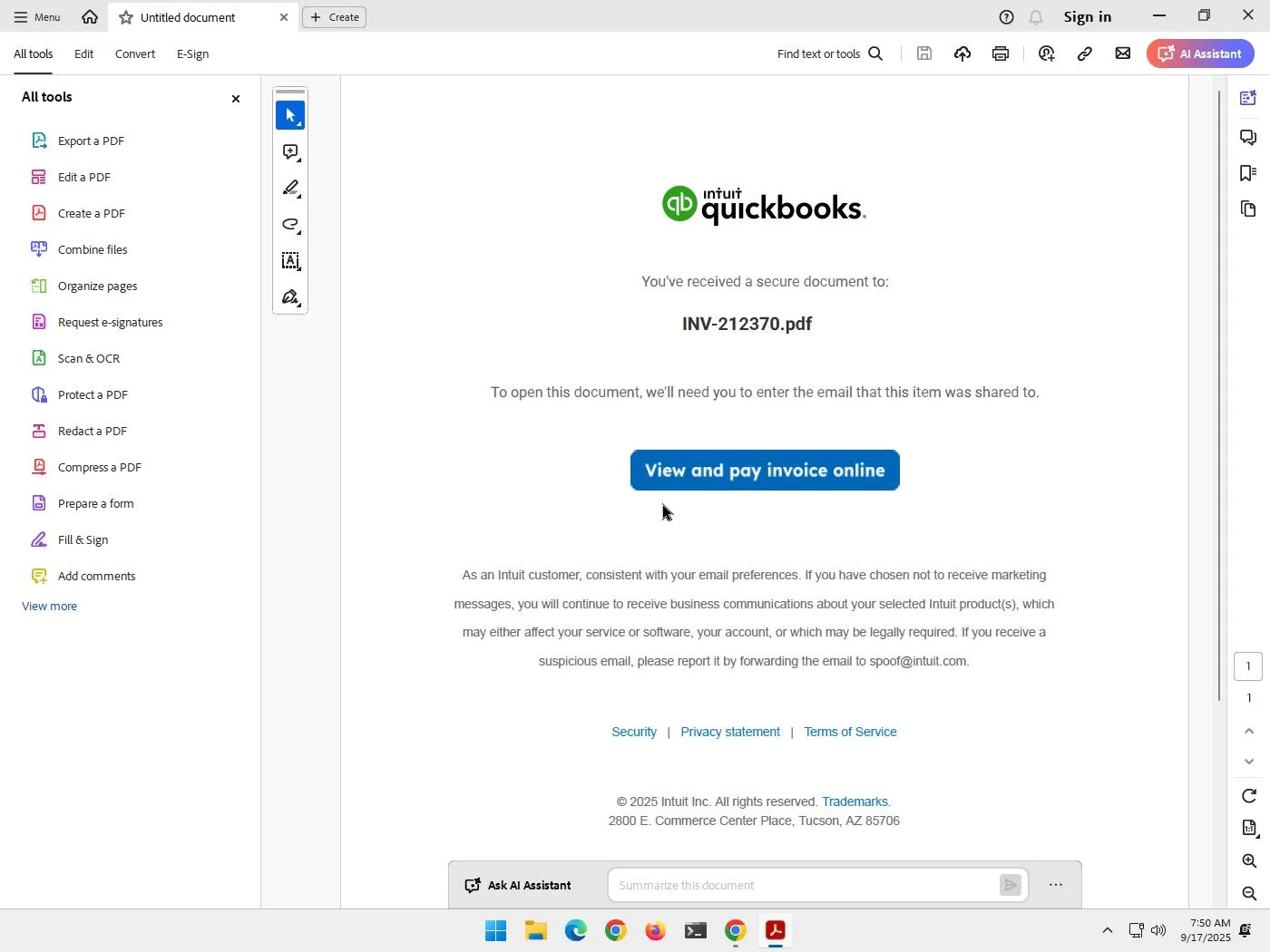
Figure 4: INV-2123701.pdf, a QuickBooks-themed invoice lure that links to bnkcontract[.]cam, rendered in the Zenbox sandbox on 17 September 2025. Screenshot from the Zenbox report on VirusTotal.
The domain stayed under one registration from 10 September 2025 until it expired on 10 September 2026, a period that covers both uses.
wmmeagency[.]cam has a Google Workspace verification record unique to the domain. On 14 October 2026, it moved to Cloudflare nameservers finley and kehlani and received new certificates. By 15 October 2026, its origin server was not responding (Cloudflare error 525). The domain is being prepared for the next operation.
Detection opportunities
The detections below are listed in the order the behaviors appear in the intrusion. The device name, OS version, and user agent tokens can change with the next build of the kit. The device code sign-in, the device registration that follows it, and the inbox rule pattern are behaviors and will last longer.
Rogue devices by name or by the ROADtools default OS version, from Entra ID audit logs:
AuditLogs
| where OperationName == "Add device"
| extend dev = tostring(TargetResources[0].displayName)
| extend props = tostring(TargetResources[0].modifiedProperties)
| where dev =~ "iAuthFlow-Device" or props has "10.0.19041.928"
Device code sign-ins to the Microsoft Authentication Broker:
union SigninLogs, AADNonInteractiveUserSignInLogs
| where AppId == "29d9ed98-a469-4536-ade2-f981bc1d605e"
| where AuthenticationProtocol == "deviceCode" or OriginalTransferMethod == "deviceCodeFlow"
Device registration within 10 minutes of a successful Broker sign-in:
let broker = union SigninLogs, AADNonInteractiveUserSignInLogs
| where AppId == "29d9ed98-a469-4536-ade2-f981bc1d605e" and ResultType == 0
| project UserPrincipalName, BrokerTime = TimeGenerated, IPAddress;
AuditLogs
| where OperationName == "Add registered owner to device"
| extend UserPrincipalName = tostring(TargetResources[1].userPrincipalName)
| join kind=inner broker on UserPrincipalName
| where TimeGenerated between (BrokerTime .. BrokerTime + 10m)
The persistence check at the start of each session, with three or more security info services in 10 seconds:
union SigninLogs, AADNonInteractiveUserSignInLogs
| where AppDisplayName in ("My Apps","My Profile","Microsoft Approval Management","Microsoft Account Controls V2")
| summarize apps = dcount(AppDisplayName), ips = dcount(IPAddress) by UserPrincipalName, bin(TimeGenerated, 10s)
| where apps >= 3
Edge user agents with a trailing Windows Server build token:
union SigninLogs, AADNonInteractiveUserSignInLogs
| where UserAgent matches regex @"Edg/\d+\.0\.0\.0 OS/10\.0\.(17763|20348)$"
Inbox rules with a one- or two-character name that move mail to Conversation History:
OfficeActivity
| where Operation in ("New-InboxRule","Set-InboxRule")
| extend p = tostring(Parameters)
| where p has "Conversation History" and p matches regex @"""Name"",""Value"":""[^A-Za-z0-9]{1,2}"""
Hard deletion of items in Sent Items:
OfficeActivity
| where Operation == "HardDelete" and tostring(Folder) has "Sent Items"
Recommendations
For security teams
- Search Entra ID for devices named
iAuthFlow-Deviceand for devices reporting Windows10.0.19041.928with no manufacturer or model. - Review sign-ins to the Microsoft Authentication Broker that used the device code flow, and check for device registrations in the minutes after each one.
- Review inbox rules with one- or two-character names, especially rules that move mail to Conversation History or mark it as read.
For IT administrators
Containment in this case was an account disable plus session revocation, and the three rogue device objects were still enabled afterward. Remove access in this order:
- Disable the account and revoke its sessions.
- Delete every rogue device object registered to the account.
- Remove authentication methods the user does not recognize, including passkeys, and check each passkey’s AAGUID.
- Reset the password.
- Remove inbox rules the user did not create, and review sent and deleted items for messages the user did not send.
Abnormal reports that, in the kit’s Google demonstration, a password reset does not remove the attacker’s enrolled passkey. A password reset on its own also leaves Entra device objects and added authentication methods in place, so remove them explicitly.
Block the device code flow with a Conditional Access authentication flows policy wherever the organization does not need it, as Microsoft recommends (Microsoft Learn). Microsoft notes that a policy targeting all resources also applies to the Device Registration Service, so exclude it only if a legitimate device registration process depends on device code sign-in.
Indicators of compromise (IOCs)
Network indicators
| Indicator | Type | Context |
|---|---|---|
i-ps-c[.]com |
Domain | Payload link target, served a decoy to scanners |
hxxps://i-ps-c[.]com/ |
URL | Link behind the fake attachment image |
bnkcontract[.]cam |
Domain | Second hop after the payload link |
hxxps://bnkcontract[.]cam/Invoice.bnkcontract.cam/?druck |
URL | Link in the September 2025 invoice lure PDF |
kinsleyconstructions[.]us |
Domain | Typosquat used for Reply-To and the payload email |
wmmeagency[.]cam |
Domain | Registrant email domain for the typosquat, staged on Cloudflare 14 October 2026 |
2603:9004:900:61c8:1747:151e:8f6b:612b |
IPv6 | Residential proxy that redeemed the token |
37.148.203[.]226 |
IPv4 | Originating IP of the compromised sender mailbox |
File hashes (SHA-256)
| Indicator | Type | Context |
|---|---|---|
c0db03c5dfa63260a7d1a3ba689793bd82bc7c1f2a0787f9155ce9893d0c30dd |
INV-2123701.pdf, September 2025 invoice lure |
|
5d96612f70258ec63c25fcff70d855e89bfc7bff52f5d6c0402534ed9d85136c |
HTML | Decoy page body served by i-ps-c[.]com |
Tenant artifacts
| Indicator | Type | Context |
|---|---|---|
iAuthFlow-Device |
Entra device name | Rogue device display name |
Windows 10.0.19041.928, no manufacturer or model |
Entra device OS | ROADtools default version |
29d9ed98-a469-4536-ade2-f981bc1d605e |
Application ID | Microsoft Authentication Broker, a legitimate Microsoft app, targeted by the device code request |
OS/10.0.17763, OS/10.0.20348 |
User agent token | Trailing token on Edge user agents |
. |
Inbox rule name | Rule that hides a sender’s mail in Conversation History |
Email and registration artifacts
| Indicator | Type | Context |
|---|---|---|
SOW_and_SiteLocation.pdf.pdf |
Image text | Fake attachment chip in the payload email |
google-site-verification=9ucbLF86yX8E0I1ybgUuUzDw0shXU9KR80XM1Xvp5nU |
DNS TXT record | Google Workspace verification for wmmeagency[.]cam |
b68575bcca97e782 |
WHOIS hash | VirusTotal-hashed registrant phone shared by both typosquat registrations |
MITRE ATT&CK mapping
| Tactic | Technique ID | Technique | Observed behavior |
|---|---|---|---|
| Resource Development | T1583.001 | Acquire Infrastructure: Domains | Aged lure domains and typosquats registered at Spaceship |
| Resource Development | T1585.002 | Establish Accounts: Email Accounts | Google Workspace mail on the typosquat domain |
| Resource Development | T1586.002 | Compromise Accounts: Email Accounts | Opener sent from a compromised third-party mailbox |
| Initial Access | T1566.002 | Phishing: Spearphishing Link | Image disguised as a PDF attachment linking to i-ps-c[.]com |
| Credential Access | T1528 | Steal Application Access Token | Device code grant issued to the operator’s Broker client |
| Persistence | T1098.005 | Account Manipulation: Device Registration | Three iAuthFlow-Device registrations |
| Defense Evasion | T1550.001 | Use Alternate Authentication Material: Application Access Token | Seven weeks of sessions on PRT-derived tokens |
| Command and Control | T1090.002 | Proxy: External Proxy | Rotating US residential and mobile proxy addresses |
| Collection | T1114.002 | Email Collection: Remote Email Collection | Outlook on the web access and sent-mail attachment downloads |
| Defense Evasion | T1564.008 | Hide Artifacts: Email Hiding Rules | Inbox rule . moving a customer’s mail to Conversation History |
| Defense Evasion | T1070.008 | Indicator Removal: Clear Mailbox Data | Sent copy of the hijack reply hard-deleted |
| Impact | T1656 | Impersonation | Reply to a customer thread as the employee |
| Impact | T1657 | Financial Theft | Reply offering ACH or Venmo payment details to a customer, with accounting removed from the recipients |
How zero trust connectivity stops the intrusion at the click
Every later stage of this intrusion depended on one network event: the target’s browser reaching i-ps-c[.]com and then bnkcontract[.]cam, two domains the business had never needed before. The device code sign-in, the rogue devices, and the seven weeks of mailbox access all followed from that page load.
ADAMnetworks adam:ONE enforces zero trust connectivity (ZTc) at the DNS layer. Its Don’t Talk To Strangers (DTTS) control denies every connection that was not first resolved through DNS and allowed by policy, and uncategorized or unknown domains are denied by default. A redirect to a second unknown domain needs its own approval, so the hop from i-ps-c[.]com to bnkcontract[.]cam is blocked the same way.
Under that policy, the click on the fake attachment in Figure 2 ends at the lookup for i-ps-c[.]com. The device code page never loads, the target never enters a code, and the operator’s client never receives a token. The cloaked decoy in Figure 3 makes no difference, because the domain is refused before any page content is served.